Queuing Model
Queuing Model Download Help License +bizpep.com
The Queuing Model will calculate the optimum number of customer service points (staff) to minimize costs for your business. It considers the average arrival rate of customers, the average customer service rate, the cost to the business of customer waiting time (customer dissatisfaction), and the cost to operate customer service points.
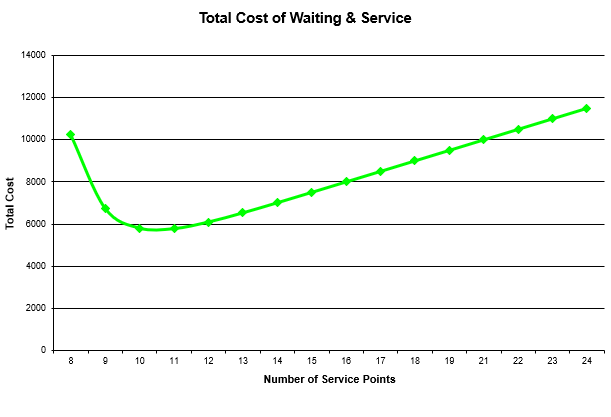
Queuing models are used extensively in call centers, toll booth operations and situations where a there is a queue for service including, counter staff, service staff, call response staff or maintenance staff. They can be applied in any business providing a customer service function. The model will calculate the optimum number of service points and allow you to test alternatives by manually inputting service point numbers. Additional results include the average number of customers waiting in the queue, their average waiting time, and service point (staff) utilization. The Total Cost Chart plots total cost verses number of service points to display the impact of changes in service point numbers.
Queuing Model Download Help License +bizpep.com
Download Queuing Model

 Download Queuing Model - Compressed Zip file
queuingmodel.zip
or
 Download Queuing Model - .xlsm file
queuingmodel.xlsm
This application is a macro-enabled spreadsheet developed in Microsoft Excel and will only function when opened using a spreadsheet program with macros enabled. You can download Queuing Model free of charge for evaluation. In evaluation mode some functionality is restricted. To license your application and fully enable all functions requires the purchase of an application license. If you have not already please consider buying a license to fully enable your application.
If you download the Compressed Zip file unzip/uncompress the downloaded file and save the content .xlsm application file. If you download the .xlsm file simply save the .xlsm file. Open the .xlsm file and follow the instructions. Macros must be enabled for this application to function. If you cannot access input or command buttons do not operate macros are not functioning. In this case please refer to your spreadsheet help to enable macros. This application does not access or alter your system or system files in any way. To uninstall simply delete the saved files.
Application suitability must be independently assessed and use indicates acceptance of any and all associated risk.
Queuing Model Download Help License +bizpep.com
Help Queuing Model
All input is on the Input Sheet. Blue cells are for input. The yellow cell provides the calculated result but can accept manual input to test alternatives. To use the model simply input the required details in the blue cells and then click the Calculate Now button and the optimum Number of Service Points will be displayed in the yellow cell. The Total Cost Chart plots Total Cost verses Number of Service Points.
Number of Service Points
When you click Calculate Now this value will be set to minimize the Total Cost of Waiting and Service. The Total Cost Chart provides a graphical display of the result. You can also manually input a positive whole number up to 100 to test alternatives. The Total Cost Chart is not updated for manual inputs. The model assumes customers form a single queue and are served by a number of service points. The value indicates the number of service points. The maximum number of service points handled is 100. The model applies the M/M/s queuing structure by assuming an exponential distribution for both arrival and service. This is suitable for most general applications.
Average Customer Arrival Rate
Input the Average Customer Arrival Rate at your service area. For example if over an hour 50 customers arrive and require service the input is 50. You can determine this by observing actual customer arrivals over the chosen period of time. Select the time period for your arrival rate measurement from the drop down list. In our example the arrival rate was 50 per hour so we select per Hour.
Service Rate Capacity per Service Pt
Input the average number of customers that a service point can process for the time selected. Because this model can only handle a maximum of 100 service points the Service Rate Capacity multiplied by 100 must be greater than the Average Customer Arrival Rate for a solution to be found. On average each of our counter staff can serve 10 customers an hour so we input 10.
Probability of No Customers
This is the probability that there will be no customers waiting or currently being served.
Average Number of Customers
This is the Average Number of Customers waiting or being served.
Average Time spent by Customer
This is the Average Time a customer spends both waiting and being served. It is displayed as a decimal value i.e. 0.10 Hours is 6 minutes.
Average Number Waiting
This is the Average Number of Customers Waiting for service.
Average Waiting Time per Customer
This is the Average time each customer waits. It is displayed as a decimal value.
Utilization of Service Points
This is the average percentage of time that service points are actually serving. A Utilization of 45% indicates that 55% of the time service points have no customers to serve.
Time Period for Consideration
Input a value for the number of Time Periods for Total Cost calculations. To review a week (50 hours of trading) we input 50.
Number of Customers for Time Period
This is the total Number of Customers arriving for service over the Time Period. It is Average Arrival Rate x Time Period for Consideration.
Total Waiting Time
This is the Total Waiting Time of all customers over the Time Period. It is the Number of Customers for Time Period x Average Waiting Time per Customer. It is in decimal format. For our example the Total Waiting Time over the 50 hour period being considered in our example is 0.63 hours (37.8 minutes). If the Average Waiting Time is less than two decimal places it will display as 0 but when multiplied by the Number of Customers for Time Period may produce a significant Total Waiting Time.
Cost of Waiting
Input the estimated average customer waiting cost. This is the average profit contribution lost due to customer dissatisfaction. To do this consider the percentage of customers that would not return if they had to wait a defined time, say 0.1 hour (6 minutes). Then estimate the value of purchases that they would have made over the period under consideration (in our case 50 hours). For example if 50% of customers would not return after waiting 0.1 hours and they would have spent $150 over the period the value of lost sales is 50% x $150 / 0.1 hours or $750/hour. This indicates that on average for every hour of customer waiting time we lose $750 in future sales for the period. To determine the actual profit contribution component of these sales we deduct our purchase cost. The average purchase cost of our goods is 40% of our sale price. Therefore the profit contribution is 60% of our sales value or $450 (60% x $750). We input $450.
Total Cost Of Waiting
This is the Total Cost of Customer Waiting for the Time Period. It is the Cost of Waiting x the Total Waiting Time.
Cost for each Service Point
Input the Cost to run each Service Point. In most cases this will be staffing costs. Lets say $10 per hour.
Total Cost of Service Points
This is the Total Cost of operating the service points over the period under consideration. It is the Number of Service Points x Time Period for Consideration x Cost for each Service Point.
Total Cost Waiting & Service
This is the Total Cost of Waiting and Service. This value is minimized when you Calculate Now by adjusting the Number of Service Points. It is the sum of Total Cost of Waiting and Total Cost of Service Points.
Calculate Now
Click Calculate Now after you have supplied input for the blue cells and the Number of Service Points to minimize the Total Cost of Waiting and Service will be calculated. This result is displayed in the yellow cell and in the Total Cost Chart. You can also test alternatives by manually inputting service point numbers into the yellow cell.
Reset
This will reset you model to initial default values and run Calculate Now to reset the Total Cost Chart. All user input will be deleted.
Queuing Model Download Help License +bizpep.com
License Queuing Model
Please consider supporting application development. Licensing your application will fully enable all functions.
License your application now
$19.95 USD per year
Secure online transaction processing is provided via PayPal. License details are sent by email as soon as your transaction is processed and will fully enable your application.
Application suitability must be independently assessed and use indicates acceptance of any and all associated risk.
Queuing Model Download Help License +bizpep.com
